-
01kraken.com › Sign up › Verify
Have a verified Kraken account
API trading needs a Kraken account verified to at least the Intermediate level, so that you can deposit USD and trade spot.
-
02Profile › Settings › API › Create API key
Open the API page
From the profile menu choose Settings › API (kraken.com/u/security/api) and press Create API key. Give it a name such as Demeter.
-
03Create API key › Permissions
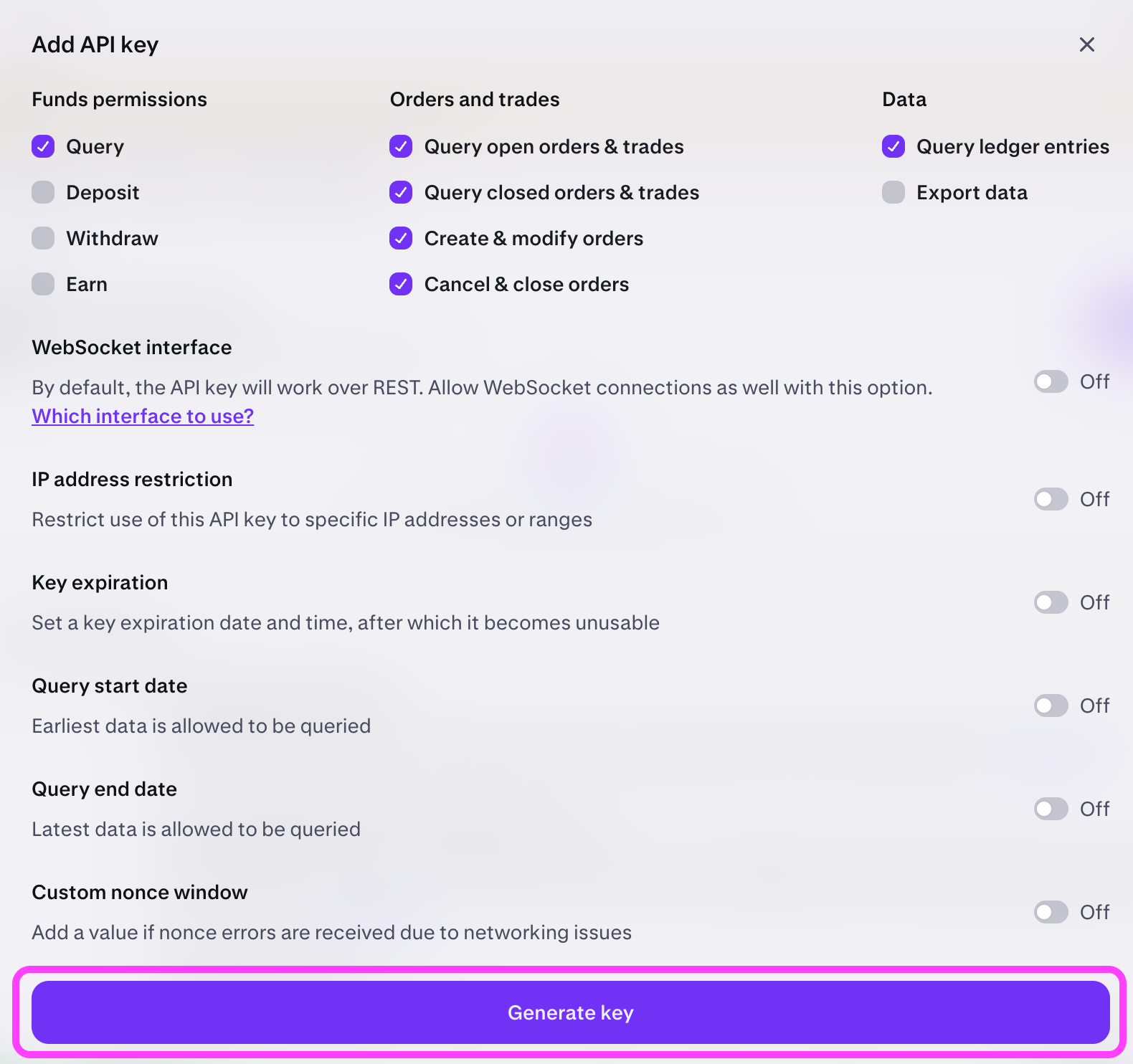
Source: Kraken Support (support.kraken.com) Choose permissions
Turn on only Query Funds, Query Open/Closed Orders & Trades, Create & Modify Orders and Cancel/Close Orders. Leave Withdraw Funds and every funding permission off. Demeter never needs them. Optionally restrict the key to your IP.
-
04Create API key › Generate key
Source: Kraken Support (support.kraken.com) Generate and copy
Press Generate key. Kraken shows the API Key and the Private Key once; copy both. If you set an expiry, note the date. Demeter tells you when a key stops working.
-
05Demeter › Settings › Trading channels · API keys
Paste into Demeter
Settings › Trading channels · API keys › Kraken: paste the API Key and Private Key, set the crypto exchange to Kraken and save.
Menu names may shift slightly as each service updates. If a step blocks you, tell us on the contact page.